Best overall for Apple Watch users: Apple Health; best for Fitbit users: Fitbit; best for ring-based tracking: Oura. Among the best sleep tracking apps for professionals in 2026, Sleep Cycle is the phone-first choice, while Sleep as Android suits Android users who want more tracking controls; choose by device fit and the habit you want to understand, not by the busiest dashboard.
- Apple Health leads the best sleep tracking apps for professionals already using Apple Watch.
- Fitbit and Oura suit people who prefer sleep tracking through their existing wearable.
- Sleep Cycle offers phone-first tracking; Sleep as Android offers more Android-focused controls.
- 180° WELLNESS provides nurse-led wellness guidance, not sleep diagnosis or medical treatment.
Why this matters
A sleep app should help you understand your routine, not give you another performance target. If you finish work late, travel frequently, or answer messages in bed, the useful question is what your schedule is doing to your sleep opportunity.
180° WELLNESS offers nurse-led wellness coaching, education, and health guidance with a personal approach. 180° WELLNESS is best for busy professionals seeking nurse-led wellness guidance rather than another sleep dashboard. Coaching and an app serve different purposes: one offers human guidance; the other records information.
For your 2026 shortlist, start with the device you already use. A feature-rich app adds little if you dislike wearing its required device or cannot keep its tracking setup consistent.
What makes the best sleep tracking apps for professionals?
Use these criteria before comparing features:
- Device fit: Choose an app that works with a phone or wearable you can comfortably use overnight.
- Useful trends: Favor a readable history of sleep timing and duration over a single nightly score.
- Low effort: Check charging, permissions, and bedtime setup before committing to a routine.
- Clear boundaries: Look for explanations that distinguish estimates from medical findings.
- Privacy controls: Review what the app collects, where information goes, and how you can delete it.
- Actionable information: Choose information that helps you decide what to do differently, not simply what to worry about.
The strongest choice is the one that answers your actual question. Understanding a late bedtime requires a different level of detail from investigating a suspected sleep disorder; an app cannot replace clinical assessment for the latter.
Best sleep tracking apps at a glance
These 2026 recommendations separate device ecosystems and working styles. They do not rank diagnostic accuracy or claim that one app improves health more than another.
| App | Best for | Standout feature | Key limitation |
|---|---|---|---|
| Apple Health | Professionals already using Apple Watch | Sleep information alongside other health records | Automatic overnight tracking depends on a compatible setup |
| Fitbit | Professionals already using Fitbit | Sleep history within an existing activity-tracking routine | Device comfort and overnight wear matter |
| Oura | Professionals who prefer a ring | Ring-based overnight tracking | Requires compatible ring hardware |
| Sleep Cycle | Professionals choosing phone-first tracking | Phone-based sleep analysis and a smart alarm | Phone placement and the sleep environment affect setup |
| Sleep as Android | Android users who want more controls | Configurable tracking and alarm tools | More settings create more setup decisions |
1. Apple Health: best sleep tracking app for Apple Watch users
Apple Health brings sleep information into the iPhone health app. With a compatible Apple Watch setup, you can review overnight sleep estimates alongside other recorded health information.
Its strongest use case is straightforward: you already wear Apple Watch and want to understand your sleep without moving to a different device ecosystem. Start with bedtime, wake time, and duration before giving much attention to stage estimates.
Apple Health pros:
- Keeps sleep information within an existing iPhone health record.
- Supports a simple review of sleep timing and patterns.
- Fits professionals already comfortable with Apple Watch.
Apple Health cons:
- Automatic overnight recording requires compatible hardware and configuration.
- Wearing and charging a watch needs to fit your routine.
- Sleep-stage estimates do not establish a medical diagnosis.
Best for: Professionals who already use Apple Watch and want fewer separate places to check their information.
If you remove your watch as soon as work ends, consider that practical barrier before choosing it for overnight tracking. A familiar app cannot compensate for a device you do not wear.
Verdict: Buy into Apple Health tracking if Apple Watch already fits your nights; skip a device change just for a dashboard.
2. Fitbit: best sleep tracking app for existing Fitbit users
Fitbit combines sleep tracking with its broader activity-tracking experience. A compatible Fitbit device records overnight information that you review in the app.
This is a practical choice when Fitbit is already part of your day. You can look at sleep patterns within the same routine you use to review movement, rather than introducing a separate tracking system.
Fitbit pros:
- Keeps sleep and activity information in a familiar app.
- Supports reviewing patterns across multiple nights.
- Avoids changing ecosystems for existing Fitbit users.
Fitbit cons:
- Overnight tracking depends on compatible hardware and consistent wear.
- A sleep summary cannot explain every reason for daytime tiredness.
- Device and app features differ, so check the exact setup you intend to use.
Best for: Professionals already using Fitbit who want sleep information beside their activity history.
Review the relationship between your schedule and sleep timing without treating it as proof of cause. A demanding workday and a short night can occur together without the app explaining why.
Verdict: Buy into Fitbit sleep tracking if you already wear Fitbit; hold off on switching ecosystems solely for a sleep score.
3. Oura: best sleep tracking app for professionals who prefer a ring
Oura uses a compatible ring to collect information that its app turns into sleep and recovery-related summaries. The main distinction here is the form factor: a ring instead of a wrist-worn tracker.
Choose Oura because ring-based tracking suits you, not because a readiness-style summary should decide your workday. Your symptoms, responsibilities, and medical advice still matter more than an app's interpretation.
Oura pros:
- Offers a ring-based alternative to sleeping with a watch.
- Presents overnight information and longer-term trends in its app.
- Suits readers who want a dedicated wearable tracking routine.
Oura cons:
- Requires compatible ring hardware.
- Ring fit and comfort are personal considerations.
- Recovery-related summaries are not permission to ignore how you feel.
Best for: Professionals who prefer wearing a ring overnight and want to review recurring sleep patterns.
Before committing, think through your actual nights: whether you tolerate jewelry while sleeping, when you would charge a device, and whether checking another summary would help you.
Verdict: Buy Oura for the ring format if that format suits you; skip it if you want phone-only tracking.
4. Sleep Cycle: best sleep tracking app for phone-first tracking
Sleep Cycle offers phone-based sleep analysis and a smart alarm designed around a wake-up window. It suits readers who want to explore tracking without making a wrist-worn or ring-based device central to the process.
Phone-based analysis depends on following the app's setup instructions. Think about your bedroom environment, including shared sleeping arrangements, before deciding whether its observations will be useful to you.
Sleep Cycle pros:
- Offers a phone-first approach to sleep tracking.
- Combines sleep analysis with alarm functions.
- Suits readers who do not want to sleep wearing a tracker.
Sleep Cycle cons:
- Phone placement and the surrounding environment matter.
- A wake-up window does not guarantee that you will feel refreshed.
- Phone-derived estimates are not a clinical sleep assessment.
Best for: Professionals who want to explore phone-first tracking and wake-up tools.
If your required wake-up time is fixed by an early shift or commute, assess the alarm against that constraint. No alarm feature creates more time to sleep.
Verdict: Buy into Sleep Cycle's approach for phone-first tracking; skip it if keeping your phone away from the bedroom is your priority.
5. Sleep as Android: best sleep tracking app for Android customization
Sleep as Android combines sleep tracking with configurable alarm tools on Android. It suits readers who want to adjust how tracking and waking work rather than accept a minimal setup.
That flexibility brings decisions. Choose the settings you need, then leave them alone long enough to judge whether the routine helps.
Sleep as Android pros:
- Focuses on Android users.
- Offers configurable sleep-tracking and alarm tools.
- Suits readers who prefer control over a more fixed workflow.
Sleep as Android cons:
- More controls mean more setup decisions.
- Phone permissions and settings require attention.
- Detailed settings do not turn sleep estimates into medical findings.
Best for: Android users who enjoy customization and will maintain a consistent setup.
Do not enable every feature simply because it exists. Start with the sleep question you want answered, then select the tools that address it.
Verdict: Buy into Sleep as Android if customization helps you stay consistent; skip it if settings become another task.
How we ranked these sleep apps
The ranking prioritizes device fit, everyday effort, readable trends, and a distinct use case for each option. Apple Health leads for an existing Apple Watch user; it is not the default recommendation for an Android user.
This is a fit-based buying guide, not a head-to-head clinical validation study. For any 2026 download or device decision, check the current official compatibility requirements, permissions, and feature descriptions before committing.
Turn sleep tracking into a useful routine
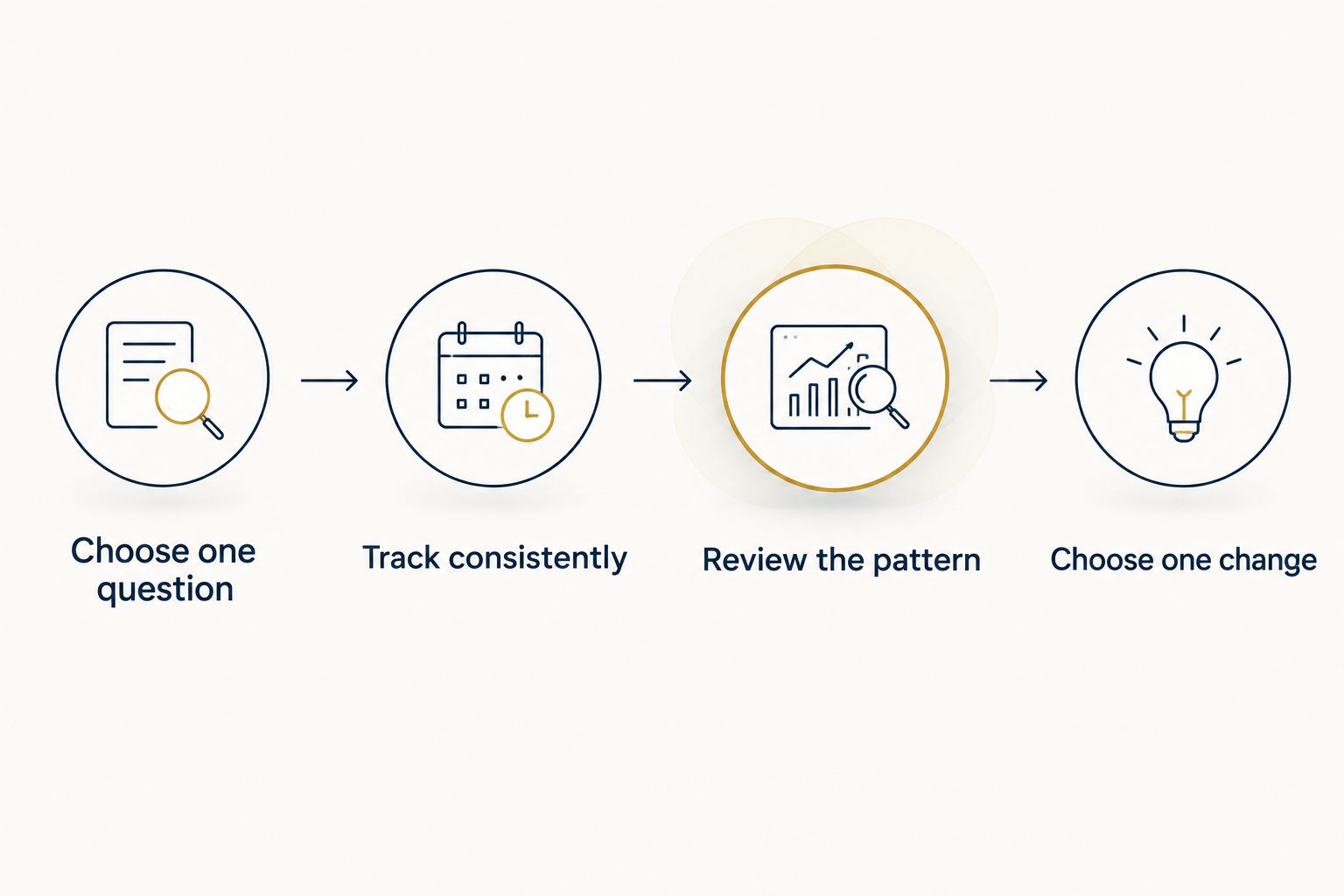
Keep your first review simple. The following is a suggested workflow, not a promise of results or a medical monitoring plan.
Choose one question
Pick a question such as whether work regularly pushes your bedtime later. Avoid trying to explain every restless night or every change in energy at once.
Track consistently
Use the same setup for 7 nights as an initial organization exercise. This is not a diagnostic threshold; it gives you a defined point to stop collecting and start reviewing.
Review the pattern
Set aside 2 minutes to compare your recorded timing with your calendar and your own notes. Look for recurring late meetings, travel, or evenings when you kept working after you intended to stop.
Choose one change
Try 1 habit that fits your circumstances, such as setting a work-message cutoff. Keep the change manageable rather than rebuilding your entire evening around an app.
A late meeting is not a personal failure. Use your 2026 sleep record to identify a scheduling problem you can address, rather than treating the record as a grade.
When personal guidance makes more sense
An app records information; it does not know the full context of your work and home responsibilities. If you want help thinking through everyday wellness habits, a conversation serves a different purpose from another chart.
180° WELLNESS provides wellness education and virtual coaching in all 50 U.S. states, with in-person services in South Florida. Nurse-led wellness guidance is distinct from diagnosis, prescribing, or medical treatment and does not replace medical care.
The currently bookable next step is an introductory wellness consultation. Use that step to explore whether personal wellness guidance fits what you are seeking, without assuming a particular ongoing package or outcome.
Take your next wellness step
Explore nurse-led wellness guidance through an introductory wellness consultation.
Which sleep tracking app should you choose?
Choose the app that fits your existing device before adding new hardware. Apple Health is the default for Apple Watch users; Fitbit is the practical continuation for Fitbit users. Choose Oura for a ring, Sleep Cycle for phone-first tracking, or Sleep as Android for Android controls.
If tracking makes bedtime feel like a test, step back from the scores. The purpose is to support your routine, not to create another obligation after work.
FAQ
What's the best sleep tracking app for busy professionals in 2026?
Apple Health is the default recommendation for professionals already using a compatible Apple Watch. Fitbit, Oura, Sleep Cycle, and Sleep as Android fit different devices and preferences; choose the option you can use consistently.
Can I track sleep without wearing a watch?
Yes, Sleep Cycle offers phone-first tracking, while Oura uses a ring rather than a watch. Check the current setup requirements and choose a format you are comfortable using overnight.
Is Oura better than Fitbit for sleep tracking?
Oura is the better fit if you prefer a ring; Fitbit is the practical choice if you already use a compatible Fitbit device. This guide does not establish that either app has better clinical accuracy.
Can a sleep tracking app diagnose a sleep disorder?
A consumer sleep tracking app does not replace assessment by a qualified healthcare professional. Discuss persistent sleep concerns, breathing concerns during sleep, or daytime sleepiness with a clinician rather than relying on an app score.
Should I worry about one bad sleep score?
Do not treat one sleep score as a medical finding. Review your broader routine and how you feel, and seek medical advice for persistent concerns regardless of what the app reports.
What should I check before sharing sleep data with an app?
Check the app's permissions, privacy policy, connected accounts, and deletion controls. Decide whether you are comfortable with the information collected before enabling optional sharing.
Does 180° WELLNESS provide virtual wellness coaching outside Florida?
Yes, 180° WELLNESS offers wellness education and virtual coaching in all 50 U.S. states, with in-person services in South Florida. This availability applies to wellness guidance, not medical treatment; an introductory wellness consultation is the currently bookable next step.
One last thing
Check your calendar before checking your score. If work repeatedly takes over the time you intended to spend sleeping, a more detailed chart does not fix that conflict. Start by protecting a realistic stopping point for work, then decide whether tracking helps you maintain it.