Best overall for guided meditation: Headspace. Best for bedtime listening: Calm. Best for organizing iPhone health information: Apple Health. Best for mood journaling: Daylio. This 2026 guide to the best wellness apps for busy professionals helps you choose a tool for the part of your day that needs support, without turning wellness into another demanding project.
- The best wellness apps for busy professionals match one clear need: meditation, bedtime listening, health tracking, or mood journaling.
- Choose Headspace for guided meditation, Calm for bedtime listening, Apple Health for health information, or Daylio for mood journaling.
- 180° WELLNESS offers nurse-led wellness education when you want personal guidance rather than another app.
- Wellness apps support everyday routines; they do not replace medical care.
Why this matters
Your calendar already asks you to make enough decisions. A wellness app should make a useful action easier, not give you another dashboard to manage. Start with the problem you want help with: taking a pause, winding down, keeping information together, or noticing how your days feel.
An app and a personal conversation serve different purposes. 180° WELLNESS offers nurse-led wellness coaching, education, and health guidance. Virtual wellness education and coaching are available across all 50 U.S. states, with in-person services in South Florida; that availability does not extend to medical treatment.
Choose an app for a specific task. Choose personal guidance when you want help thinking through your wellness priorities. Neither choice replaces diagnosis, prescribing, or medical care.
What makes the best wellness apps for busy professionals?
For this 2026 shortlist, the deciding question is simple: does the app's main purpose match something you actually want to do?
- Clear purpose: You should know whether you are opening the app to meditate, listen, review information, or make a journal entry.
- Manageable effort: Choose an activity that fits a real break in your schedule, not an idealized version of your day.
- Useful feedback: Look for information you can understand without treating every chart or entry as a medical finding.
- Device fit: Check operating-system requirements and any connections you need before investing time in setup.
- Privacy fit: Review what information you enter, what access you grant, and how to change those permissions.
- Appropriate boundaries: A wellness tool should not become your substitute for professional assessment or treatment.
You do not need an app that covers everything. You need a reason to open it and a clear point at which you can close it.
Best wellness apps at a glance
This 2026 comparison separates the apps by purpose rather than treating different tools as interchangeable. The limitations matter as much as the features.
| App | Best for | Standout function | Key limitation |
|---|---|---|---|
| Headspace | Meditation | Guided meditation sessions | Recorded guidance is not an individual conversation |
| Calm | Bedtime listening | Sleep Stories and relaxation audio | Listening does not assess persistent sleep difficulties |
| Apple Health | Health tracking | Organizing supported health information on iPhone | Depends on the information entered or connected |
| Daylio | Mood journaling | Mood entries paired with activity tracking | Entries reflect your observations, not a diagnosis |
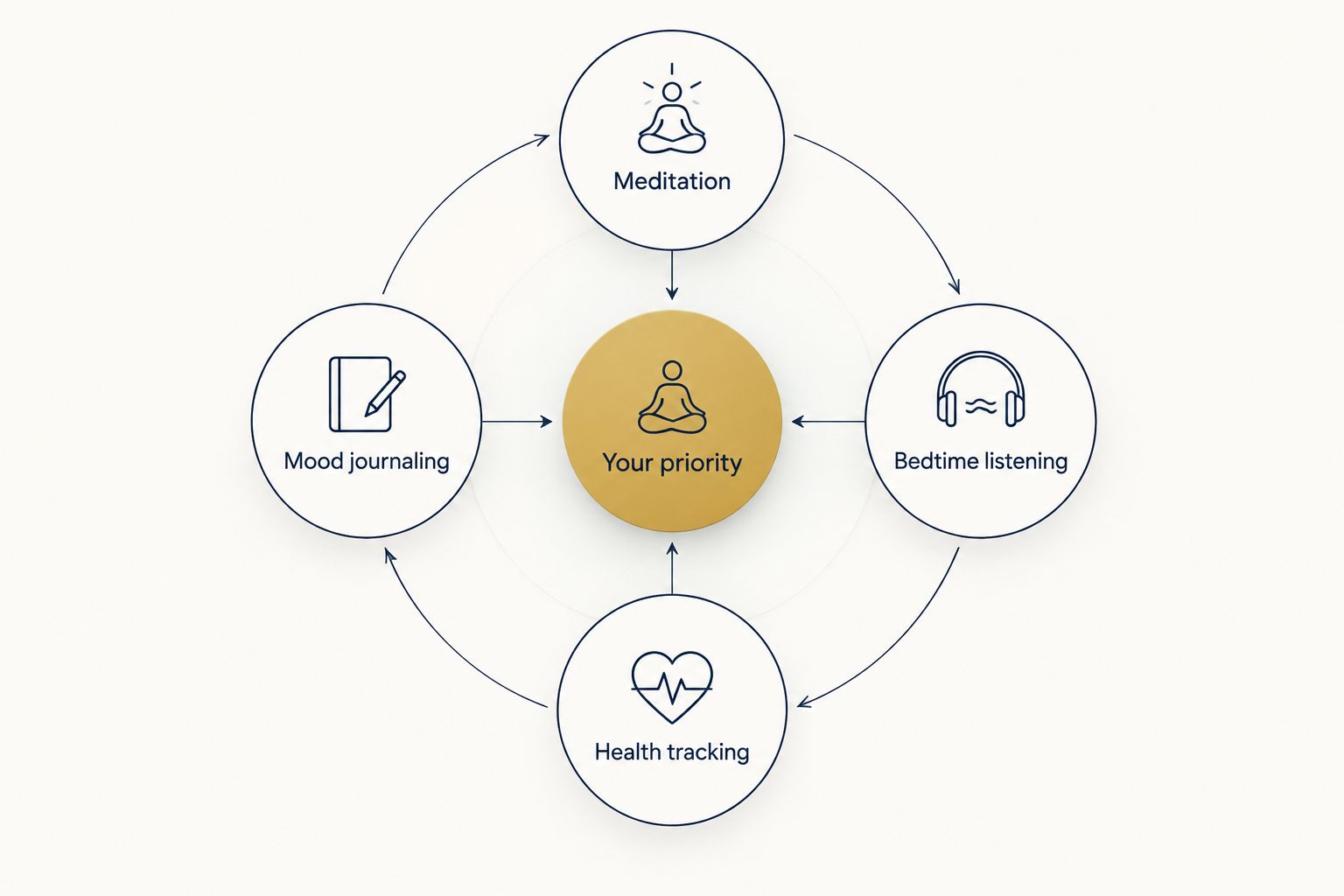
Use these four priorities to narrow your choice:
- Meditation: You want someone to guide you through a practice.
- Bedtime listening: You want audio to accompany your wind-down routine.
- Health tracking: You want supported information together rather than scattered.
- Mood journaling: You want a simple record of how your days feel.
1. Headspace: best wellness app for guided meditation
Headspace provides guided meditation content. It fits a specific need: you want to practice meditation but prefer spoken direction to deciding what to do on your own.
For a busy professional, a useful starting point is a break that already exists. You might set aside 5 minutes after lunch for a practice, rather than expecting yourself to create a completely new morning routine.
Headspace pros:
- Guided sessions give your practice a clear structure.
- Spoken instruction suits people who prefer following along.
- Meditation offers a defined activity rather than an open-ended feed to browse.
Headspace cons:
- Recorded guidance cannot respond to your individual questions.
- Audio-led practice is a poor fit when you want quiet, screen-free reflection without instruction.
Best for: Professionals who want guided meditation as a repeatable part of their day.
The practical test is whether you want to return to the activity itself. If selecting a session becomes another task you avoid, simplify your choice instead of adding more content to your list.
Verdict: Choose Headspace for guided meditation; skip it if your main need is organizing health information or recording moods.
2. Calm: best wellness app for bedtime listening
Calm offers meditation, relaxation audio, and Sleep Stories. Its distinct place in this shortlist is bedtime listening: audio you can use as part of winding down after work.
That use case matters when your working day has no obvious endpoint. Rather than browsing indefinitely, decide what you want to hear before starting your evening routine.
Calm pros:
- Sleep Stories provide a clear option for bedtime listening.
- Audio offers an alternative to reading more material on a screen.
- Meditation content gives you another use beyond your evening routine.
Calm cons:
- Audio is not a good match if sound keeps you engaged when you want quiet.
- A listening app cannot assess why you are having persistent trouble sleeping.
Best for: Professionals who enjoy spoken audio during their wind-down routine.
Keep the distinction between a preference and a health concern clear. Enjoying a bedtime story is one thing; relying on an app to explain ongoing sleep difficulties is another. Bring persistent concerns to a qualified healthcare professional.
Verdict: Choose Calm for bedtime audio; skip it if your preferred evening routine involves no device or sound.
3. Apple Health: best wellness app for iPhone health information
Apple Health organizes supported health information on iPhone. It is a different kind of wellness tool from a meditation app: its main value here is keeping information together, not leading a relaxation practice.
The useful question is not how much information you can collect. It is which information you want to review and whether you understand where it comes from.
Apple Health pros:
- Brings supported health information into one place.
- Lets you review information from sources you choose to enter or connect.
- Supports a tracking-focused approach rather than a content-led routine.
Apple Health cons:
- It is not the right choice for someone seeking an Android app.
- Missing or inconsistent source information limits what you can learn from the record.
- A health dashboard does not explain the medical meaning of a change.
Best for: iPhone users who want to organize supported health information.
Be selective about connections and permissions. Before adding another source, ask what question that information will help you answer. If a reading concerns you, discuss it with a healthcare professional rather than interpreting the chart alone.
Verdict: Choose Apple Health for organizing information on iPhone; skip it as your main tool for guided meditation or personal coaching.
4. Daylio: best wellness app for mood journaling
Daylio pairs mood entries with activity tracking. It suits people who want to record how a day felt without making a long written journal entry.
For someone moving between meetings, travel, and home responsibilities, a brief entry creates a record to revisit. The point is observation, not giving yourself a daily performance grade.
Daylio pros:
- Centers the routine on recording mood and activities.
- Offers an alternative to long-form written journaling.
- Creates a personal record you can review over time.
Daylio cons:
- The record depends on what you remember and choose to enter.
- Two things appearing together does not prove that one caused the other.
- Mood tracking is not a mental health assessment or treatment.
Best for: Professionals who want a brief, repeatable mood-journaling habit.
Keep entries descriptive. Recording that you felt drained after a demanding day gives you something to reflect on; it does not establish a medical explanation. Stop treating the record as useful if it becomes a source of self-criticism rather than understanding.
Verdict: Choose Daylio for mood journaling; skip it if you want guided audio or an explanation of symptoms.
How the apps were ranked
The 2026 recommendations match each app's established purpose to a distinct everyday task. Headspace is the default for guided meditation, while Calm, Apple Health, and Daylio serve different priorities.
The ranking follows the criteria above: clear purpose, manageable effort, useful feedback, device fit, privacy fit, and appropriate boundaries. It is not a ranking of clinical effectiveness, and it does not promise health results.
The best choice is the app whose main task matches your reason for opening it. A longer feature list does not settle that decision.
Which wellness app should you choose?
If you are undecided and specifically want a guided practice, start with Headspace. Choose Calm instead for bedtime listening, Apple Health for organizing iPhone health information, or Daylio for mood journaling.
For your 2026 routine, try this small experiment:
- Name one task. Write down what you want the app to help you do.
- Choose one cue. Attach the task to something predictable, such as finishing lunch or closing your work computer.
- Set a boundary. Reserve 10 minutes to explore the app, then stop browsing and choose your activity.
- Review the fit. After 7 days, ask whether the app made that task easier to begin.
These are suggested planning boundaries, not a treatment schedule or a promise of results. Keep what fits and change what creates extra work.
When a conversation fits better than an app
You might know plenty about wellness and still want someone to talk through your priorities with you. 180° WELLNESS offers nurse-led wellness education for busy professionals who want a personal approach.
An introductory wellness consultation is the currently bookable next step. Keep its purpose clear: wellness coaching and education are distinct from diagnosis, prescribing, and medical treatment.
Book an introductory wellness consultation
Take the next step toward nurse-led wellness education and personal guidance.
FAQ
What's the best wellness app for a busy professional?
Headspace is the default recommendation here for guided meditation. Choose Calm for bedtime listening, Apple Health for iPhone health information, or Daylio for mood journaling instead if that task better matches your needs.
Is Headspace better than Calm?
Headspace is the recommendation here for guided meditation, while Calm gets the bedtime-listening recommendation. Choose according to the activity you want, rather than treating either app as best for every wellness goal.
Which wellness app should I use to track my mood?
Daylio is this shortlist's choice for mood journaling. Its entries provide a personal record of moods and activities, not a diagnosis or proof of what caused a change.
Is Apple Health useful without lots of connected devices?
Apple Health's usefulness depends on the supported information you enter or connect, not on collecting as many devices as possible. Start with the information you actually want to review.
Can a wellness app replace talking to a nurse or doctor?
A wellness app does not replace medical care, diagnosis, or prescribing. Apps can support everyday routines and recordkeeping, while health concerns need appropriate professional assessment.
How do I choose a wellness app without spending hours comparing them?
Choose one task before comparing apps. Decide whether you want guided meditation, bedtime listening, organized health information, or mood journaling, then check device requirements and privacy settings.
Does 180° WELLNESS offer virtual wellness coaching outside Florida?
180° WELLNESS offers virtual wellness education and coaching across all 50 U.S. states, with in-person services in South Florida. This availability applies to wellness education and coaching, not medical treatment; an introductory wellness consultation is the currently bookable next step.
One last thing
Decide when you will close the app before you open it. Finish the meditation, complete the entry, or review the information you came for—then return to your day.
Your 2026 wellness routine does not need more digital activity for its own sake. Give each tool one useful job, and keep room for support beyond your screen.